> ## Documentation Index
> Fetch the complete documentation index at: https://docs.tryreason.dev/llms.txt
> Use this file to discover all available pages before exploring further.
# reason()
> It calls a LLM and get its response
## Overview
`reason()` *— and* `reasonStream()` *—* is one of the main building blocks of RΞASON. It allows you to call a LLM and gets its output:
```ts src/entrypoints/test.ts theme={null}
import { reason } from 'tryreason'
export async function POST(req: Request) {
return reason('tell me about San Francisco — be brief please.')
}
```
In order to use `reason()` you need to first [set your OpenAI API Key](/docs/quickstart#setting-your-api-key).
Calling the `test` [entrypoint](/docs/essentials/entrypoints) in the [RΞASON Playground](/docs/quickstart#rksason-playground) will result in:
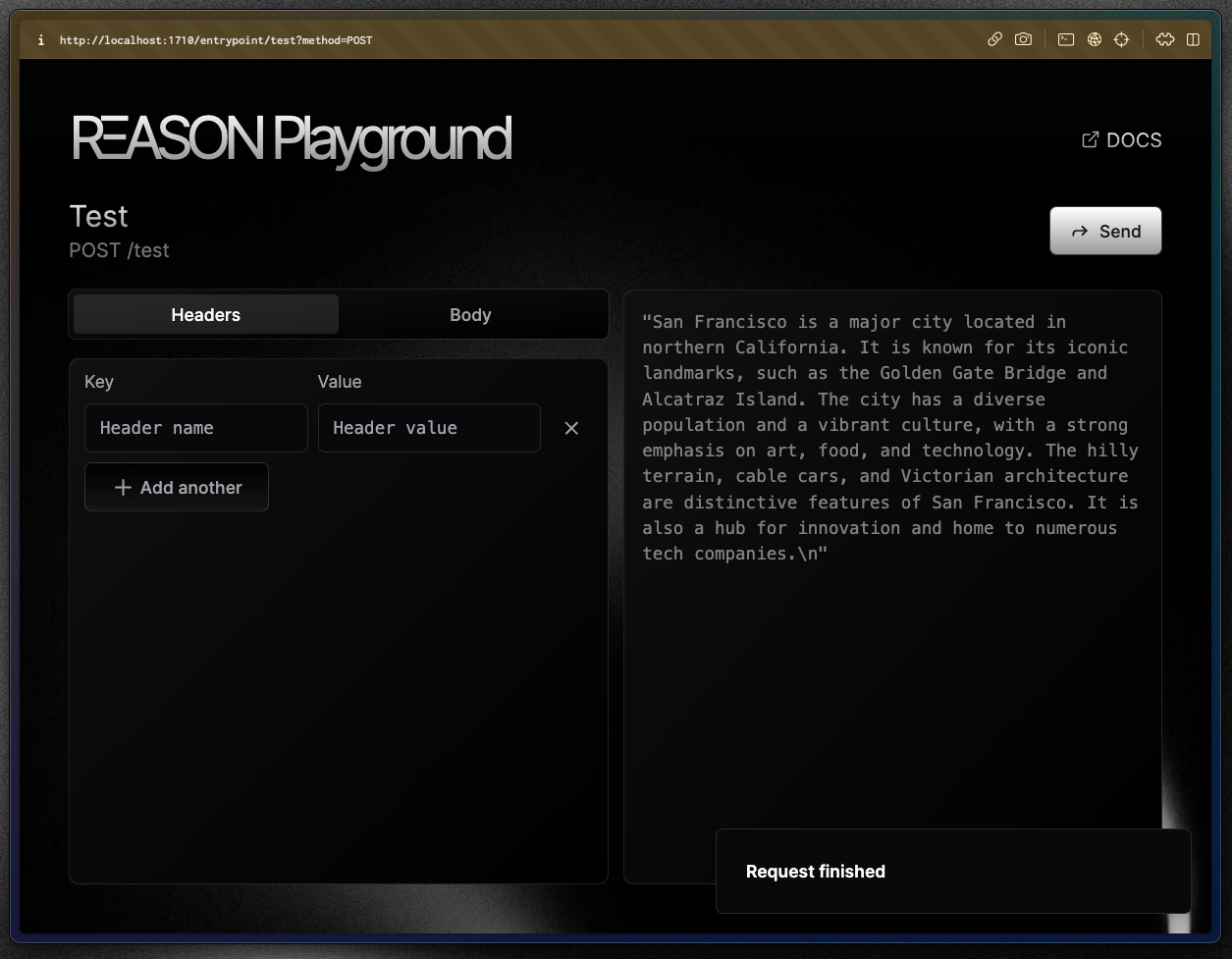 `reason()` just calls the default LLM you defined in the `.reason.config.js` file and returns the completion for you.
There's also the streaming variant called `reasonStream()`:
```ts src/entrypoints/test.ts theme={null}
import { reasonStream } from 'tryreason'
export async function* POST(req: Request) {
return reasonStream('tell me about San Francisco — be brief please.')
}
```
Which will stream the response in real-time:
### `reason` vs `reasonStream`
It is important to note that `reason()` and `reasonStream()` are the same function with the distiction being that one streams data from the LLM in real-time and the other only returns when the LLM has fully finished.
For instance:
```ts theme={null}
const completion = await reason('tell me a joke')
console.log(completion)
// vs
for await (const completion of reasonStream('tell me a joke')) {
console.log(completion.value)
}
```
Will log:
```
reason():
Why don't scientists trust atoms? because they make up everything
reasonStream():
Why don't
Why don't scientists trust
Why don't scientists trust atoms? because
Why don't scientists trust atoms? because they make up
Why don't scientists trust atoms? because they make up everything
```
`reason()` just calls the default LLM you defined in the `.reason.config.js` file and returns the completion for you.
There's also the streaming variant called `reasonStream()`:
```ts src/entrypoints/test.ts theme={null}
import { reasonStream } from 'tryreason'
export async function* POST(req: Request) {
return reasonStream('tell me about San Francisco — be brief please.')
}
```
Which will stream the response in real-time:
### `reason` vs `reasonStream`
It is important to note that `reason()` and `reasonStream()` are the same function with the distiction being that one streams data from the LLM in real-time and the other only returns when the LLM has fully finished.
For instance:
```ts theme={null}
const completion = await reason('tell me a joke')
console.log(completion)
// vs
for await (const completion of reasonStream('tell me a joke')) {
console.log(completion.value)
}
```
Will log:
```
reason():
Why don't scientists trust atoms? because they make up everything
reasonStream():
Why don't
Why don't scientists trust
Why don't scientists trust atoms? because
Why don't scientists trust atoms? because they make up
Why don't scientists trust atoms? because they make up everything
```
By the way: At any point you can test your entrypoint in the [RΞASON Playground](/docs/quickstart#rksason-playground).
In this page, we'll use `reason()` and `reasonStream()` interchangeably and everything talked here applies to both functions.
Although they only differ in one aspect, there are some important concepts to learn when working with `reasonStream()`, we'll go over in the next page.
***
# The real magic
So far both `reason()` and `reasonStream()` functions seems nothing out of the ordinary. *The real magic* kicks in when we pass an `interface` to it:
```ts src/entrypoints/test.ts theme={null}
import { reason } from "tryreason";
interface City {
description: string;
state: string;
country: string;
}
export async function POST(req: Request) {
return reason('tell me about San Francisco')
}
```
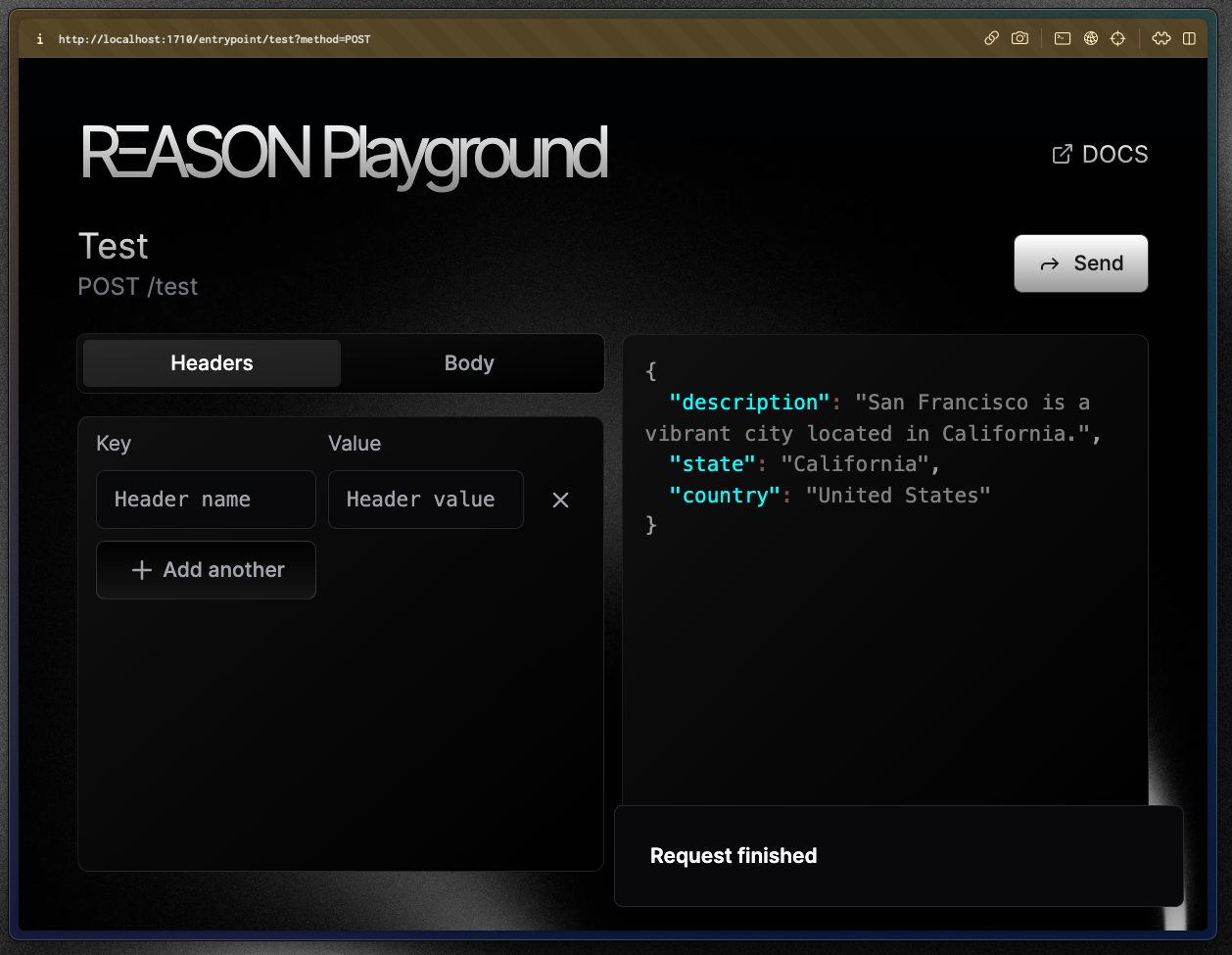
This returns:
 ### Wait, what?!
**Yep — RΞASON uses your TypeScript interface to *actually* ensure the LLM return in an object in that format.**
It is a two-step process:
1. Somehow get the interface during runtime;
2. Somehow ensure the LLM response conforms to the interface.
### Getting the interface
When you run `npm run dev` what you are actually running is `npx reason dev`, which runs the RΞASON transpiler.
The RΞASON transpiler — as the name suggests — transpile your code to a different representation.
For instance, the previous examples gets transpiled to:
```js theme={null}
import { __internal_DO_NOT_USE_reason as reason } from "tryreason";
export async function POST(req) {
return reason('tell me about San Francisco', null, [{
name: "description",
type: "{\"type\":\"string\"}",
prompt: "",
required: true
}, {
name: "state",
type: "{\"type\":\"string\"}",
prompt: "",
required: true
}, {
name: "country",
type: "{\"type\":\"string\"}",
prompt: "",
required: true
}]);
}
```
As you can see, the `City` interface gets converted to an object that is passed as a parameter to `reason()`.
The inspiration came from [React](https://react.dev/): they created a new syntax ([JSX](https://react.dev/learn/writing-markup-with-jsx)) for writing "HTML" in `.js` files that gets transpiled to normal JavaScript. The same is true with RΞASON — except we didn't create a new syntax, we changed how `interfaces` are used.
### Ensuring the LLM conforms to the interface
RΞASON uses [function calling](https://platform.openai.com/docs/guides/function-calling) to ensure a LLM returns an object that conforms to an interface.
For OpenAI's models that support [JSON mode](https://platform.openai.com/docs/guides/text-generation/json-mode) we use that instead of function calling.
This means that RΞASON can support any model that has the ability to call functions.
This means that changes to the interface passed to `reason()` or `reasonStream()` will **change its output as well**.
If we add a new property called `population`:
```ts src/entrypoints/test.ts theme={null}
import { reason } from "tryreason";
interface City {
description: string;
state: string;
country: string;
population: number; // 👈 new property
}
export async function POST(req: Request) {
return reason('tell me about San Francisco')
}
```
Our entrypoint will now return `population`:
### Wait, what?!
**Yep — RΞASON uses your TypeScript interface to *actually* ensure the LLM return in an object in that format.**
It is a two-step process:
1. Somehow get the interface during runtime;
2. Somehow ensure the LLM response conforms to the interface.
### Getting the interface
When you run `npm run dev` what you are actually running is `npx reason dev`, which runs the RΞASON transpiler.
The RΞASON transpiler — as the name suggests — transpile your code to a different representation.
For instance, the previous examples gets transpiled to:
```js theme={null}
import { __internal_DO_NOT_USE_reason as reason } from "tryreason";
export async function POST(req) {
return reason('tell me about San Francisco', null, [{
name: "description",
type: "{\"type\":\"string\"}",
prompt: "",
required: true
}, {
name: "state",
type: "{\"type\":\"string\"}",
prompt: "",
required: true
}, {
name: "country",
type: "{\"type\":\"string\"}",
prompt: "",
required: true
}]);
}
```
As you can see, the `City` interface gets converted to an object that is passed as a parameter to `reason()`.
The inspiration came from [React](https://react.dev/): they created a new syntax ([JSX](https://react.dev/learn/writing-markup-with-jsx)) for writing "HTML" in `.js` files that gets transpiled to normal JavaScript. The same is true with RΞASON — except we didn't create a new syntax, we changed how `interfaces` are used.
### Ensuring the LLM conforms to the interface
RΞASON uses [function calling](https://platform.openai.com/docs/guides/function-calling) to ensure a LLM returns an object that conforms to an interface.
For OpenAI's models that support [JSON mode](https://platform.openai.com/docs/guides/text-generation/json-mode) we use that instead of function calling.
This means that RΞASON can support any model that has the ability to call functions.
This means that changes to the interface passed to `reason()` or `reasonStream()` will **change its output as well**.
If we add a new property called `population`:
```ts src/entrypoints/test.ts theme={null}
import { reason } from "tryreason";
interface City {
description: string;
state: string;
country: string;
population: number; // 👈 new property
}
export async function POST(req: Request) {
return reason('tell me about San Francisco')
}
```
Our entrypoint will now return `population`:
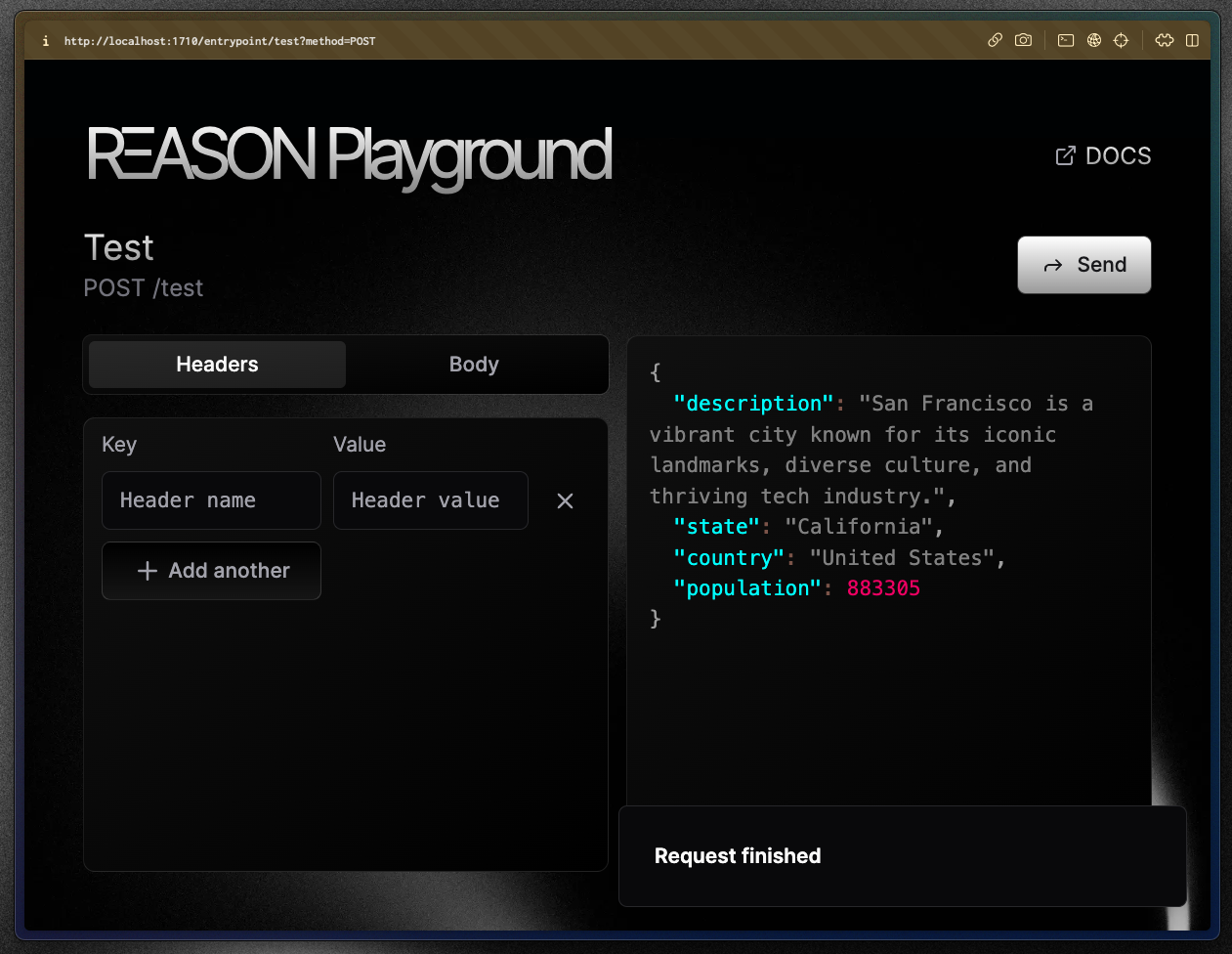
This was just an example. In real world usage getting the population from a LLM is *probably* not the best idea ever.
### Will the LLM always output a valid object?
This is a great question.
LLMs are non deterministic, making it impossible to **assure** they will always return the object that conforms to your `interface`.
### How does RΞASON handle when the LLM outputs an invalid object?
By default, RΞASON will throw an error in your code and point to what properties are missing/wrong.
This can be changed to an `ignore` behaviour, where RΞASON will not throw an error and continue as if everything was normal — [read more here](#reason-options)
### What can I do to make sure the LLM outputs a valid object?
There five things you can do:
1. Try a different prompt;
2. Try different names for the interface properties as they are passed to the LLM inside your prompt;
3. Use JSDoc to create good descriptions for your properties as they are also passed to the LLM;
4. Make your `interface` less complex;
5. Use a more capable model.
All LLMs available to use with RΞASON are pretty capable and will handle 99% of interfaces and cases with ease, and by doing the above you also greatly increase the chance of the LLM outputting the right object.
However, LLMs are non deterministic and to make a great a LLM app, you as the developer should be prepared to deal with cases where the LLM outputs an invalid object.
## Passing `interfaces` to `reasonStream()`
Naturally, you can also pass a `interface` to `reasonStream()` to have the object streamed:
```ts src/entrypoints/test.ts theme={null}
import { reasonStream } from "tryreason";
interface City {
description: string;
state: string;
country: string;
population: number;
}
export async function* POST(req: Request) {
return reasonStream('tell me about San Francisco')
}
```
Calling this in the [RΞASON Playground](/docs/quickstart#rksason-playground):
Be aware that there are certain rules when passing an `interface` to `reason()` and we'll go over them in a bit. First, we want to highlight that RΞASON has an ESLint plugin that *really helps* developers.
## RΞASON ESLint plugin
Since RΞASON adds a little bit of new syntax, having an ESLint plugin becomes important because it wants developers while they're in their IDE (vscode, nvim, etc) that something is wrong.
Let's take a look at a code that will error in RΞASON:
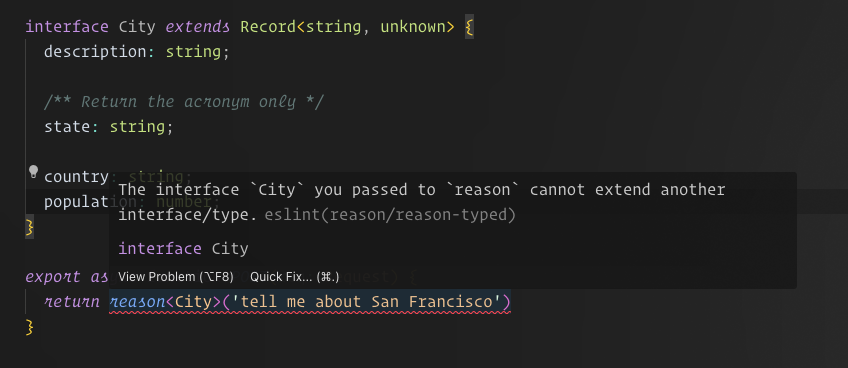 With the ESLint plugin, your IDE warns to you whenever you create something that is not valid in RΞASON. This greatly increases your development speed.
We cannot stress how **much having this helps developers** use RΞASON. Make sure its working for you.
If you installed RΞASON using `npx use-reason`, the only thing you should do is **install the ESLint plugin for your IDE**. Most developers already have it installed, but we recommend checking to make sure.
## `interface` rules
The `interface` you pass to `reason()` (or `reasonStream()`) needs to follows some rules. Here they are:
* The `interface` needs to be fully defined within the same file that calls `reason()`;
* The `interface` cannot `extend` another `interface`/`type`;
* You can only pass an `interface` to `reason()`, for instance `reason()` is invalid;
* The `interface` you pass cannot be empty. It needs to have at least one property;
* The `interface` cannot use utility types (`Omit<>`, `Partial<>`, etc);
With the ESLint plugin, your IDE warns to you whenever you create something that is not valid in RΞASON. This greatly increases your development speed.
We cannot stress how **much having this helps developers** use RΞASON. Make sure its working for you.
If you installed RΞASON using `npx use-reason`, the only thing you should do is **install the ESLint plugin for your IDE**. Most developers already have it installed, but we recommend checking to make sure.
## `interface` rules
The `interface` you pass to `reason()` (or `reasonStream()`) needs to follows some rules. Here they are:
* The `interface` needs to be fully defined within the same file that calls `reason()`;
* The `interface` cannot `extend` another `interface`/`type`;
* You can only pass an `interface` to `reason()`, for instance `reason()` is invalid;
* The `interface` you pass cannot be empty. It needs to have at least one property;
* The `interface` cannot use utility types (`Omit<>`, `Partial<>`, etc);
There's also some rules about the type that each property in your `interface` can have:
* The following are invalid types: `any`, `unknown`, `void`, `null`, `never`, `undefined` and `this`;
* Literal types are not allowed. A literal type is `foo: 'bar'`;
* `property1: "foo" | "bar" | 10` is valid but `property1: string | number` is not;
***
## JSDoc comments
In our previous example the LLM was returning:
```json theme={null}
{
"description": "San Francisco is a vibrant city known for its iconic landmarks, diverse culture, and thriving tech industry.",
"state": "California",
"country": "United States",
"population": 883305
}
```
But suppose we want `state` to be `CA` instead of `California` — `TX` instead of `Texas`, etc. Well, that's easy: Just ask to the LLM!
```ts src/entrypoints/test.ts theme={null}
import { reason } from "tryreason";
interface City {
description: string;
/** Return the acronym only */
state: string;
country: string;
population: number;
}
export async function POST(req: Request) {
return reason('tell me about San Francisco')
}
```
Will return:
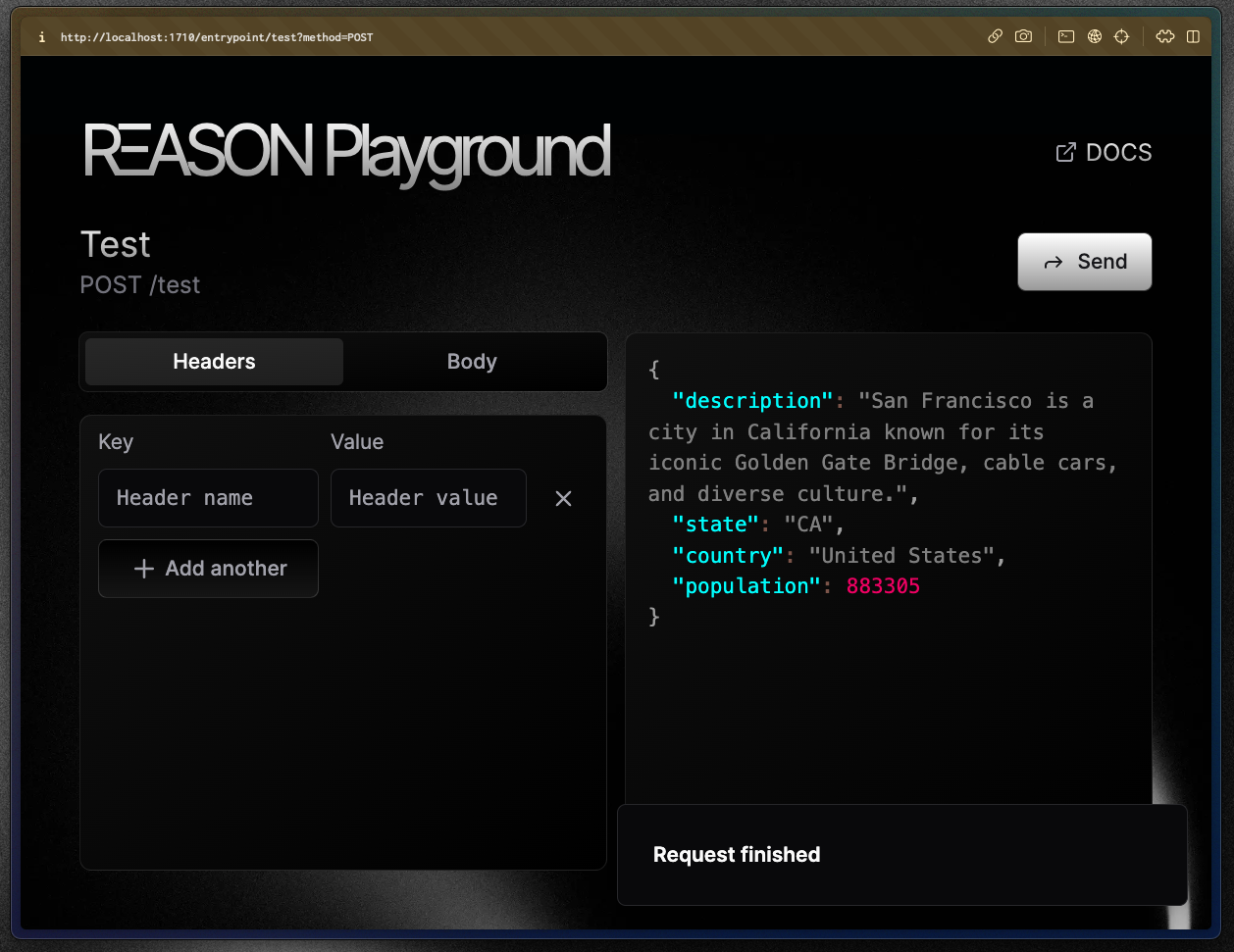 The only thing we added to make this work was the `/** Return the acronym only */` comment above the `state` property. It worked because:
* JSDoc comments above a property in the interface are passed into your prompt to the LLM:
* Precisely, it is passed as the description for the parameter in the function calling body.
* Then the LLM just followed the instructions you passed;
* You should treat JSDoc comments the same you treat prompts — after all, they go in the prompt for the LLM.
But, **what is "JSDoc"?**
If you are familiar with JSDoc, feel free to skip the next section.
### JSDoc
Have you ever noticed that some functions have a description when you hover over them?
The only thing we added to make this work was the `/** Return the acronym only */` comment above the `state` property. It worked because:
* JSDoc comments above a property in the interface are passed into your prompt to the LLM:
* Precisely, it is passed as the description for the parameter in the function calling body.
* Then the LLM just followed the instructions you passed;
* You should treat JSDoc comments the same you treat prompts — after all, they go in the prompt for the LLM.
But, **what is "JSDoc"?**
If you are familiar with JSDoc, feel free to skip the next section.
### JSDoc
Have you ever noticed that some functions have a description when you hover over them?
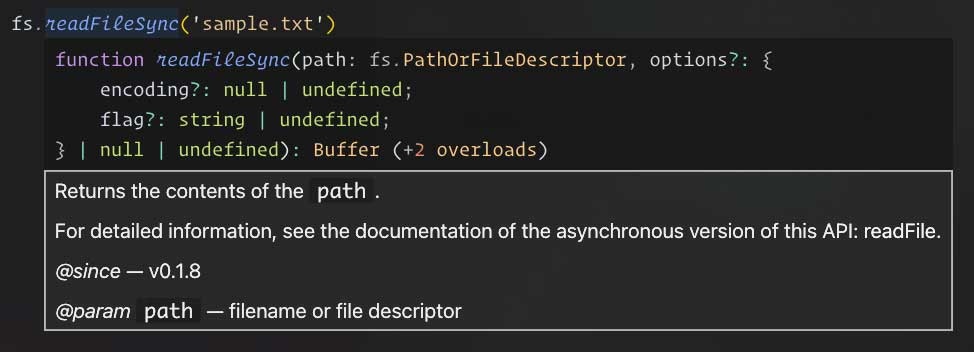 Well, the way those are defined is through JSDoc! Let's take a peek at the `fs.readFileSync()` definition:
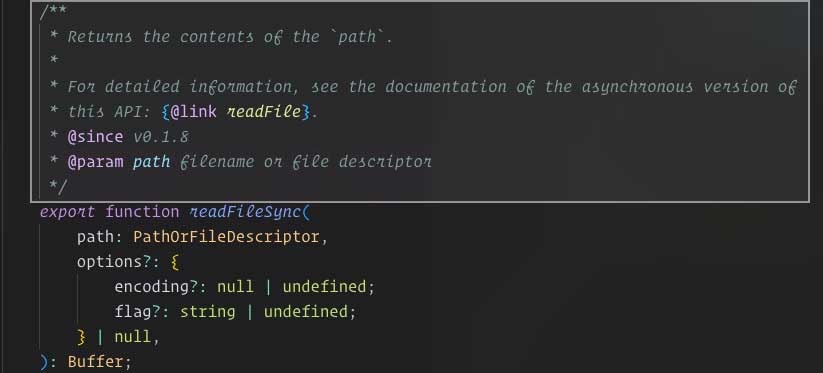 As you may have noticed, JSDoc comment are not like normal code comments:
1. They need to be defined as `/** comment */`;
2. Your IDE uses them to show code hints — showing them when you hover (and some other times);
3. And RΞASON uses them as part of your prompt to the LLM.
[JSDoc is a standard](https://jsdoc.app/) to documment your code that most IDEs follow, that is why when you add JSDoc comments your IDE shows it when you hover over.
### How to add a JSDoc comment
Adding a basic JSDoc comment is easy:
```ts theme={null}
/**
* Hi! I'm JSDoc comment
*/
function foo() {
}
/** I'm another JSDoc comment */
function bar() {
}
```
The logic behind is simple:
* Every line of the comment needs to start with a `*`;
* The comment has to be created with `/** {comment} */`:
* `//* I'm an invalid JSDoc comment :(` is an invalid JSDoc comment.
RΞASON uses JSDoc in a few of places, but in the context of `reason()` and `reasonStream()` their only use is above interface's properties as property description for the LLM.
```ts theme={null}
interface City {
description: string;
/** Return the acronym only */
state: string;
country: string;
population: number;
}
export async function POST(req: Request) {
return reason('tell me about San Francisco')
}
```
To verify if you created a valid JSDoc comment, you can just hover over the property:
As you can see in the video, vscode (in this case) correctly shows the `Return the acronym only` when `state` is hovered.
***
# `reason()` options
There are some options you can pass to `reason()` and `reasonStream()` to change their behaviour:
```ts theme={null}
import { reason } from 'tryreason'
const completion = await reason('Some prompt', {
model: 'gpt-4',
max_tokens: 2000,
temperature: 0.2,
validation_strategy: 'error'
})
```
Here's what each does:
* `model`: which LLM model to use;
* `max_tokens`: the maximum number of tokens the LLM can return;
* `temperature`: set the [temperature of the LLM]();
* `validation_strategy`: what should RΞASON do if the LLM outputs an object that does not conforms to the `interface` you passed, possible values:
* `error`: the default value and it means that RΞASON will throw an error if the object is invalid;
* `ignore`: RΞASON will ignore the invalid object.
## Example using nested objects
To solidify your knowledge, let's go through a more complex example.
Let's say we are building a website that users can input a city they plan to visit and we show them some cool places to visit in that city:
```ts theme={null}
import { reasonStream } from 'tryreason'
interface City {
/** An one sentence description of the city */
description: string;
points_of_interest: {
name: string;
description: string;
address: {
address_line: string;
latitude: number;
longitude: number;
};
}[];
}
export async function* POST(req: Request) {
const { city } = await req.json()
return reasonStream(`Tell me about ${city}`)
}
```
Will return:
As you may have noticed, JSDoc comment are not like normal code comments:
1. They need to be defined as `/** comment */`;
2. Your IDE uses them to show code hints — showing them when you hover (and some other times);
3. And RΞASON uses them as part of your prompt to the LLM.
[JSDoc is a standard](https://jsdoc.app/) to documment your code that most IDEs follow, that is why when you add JSDoc comments your IDE shows it when you hover over.
### How to add a JSDoc comment
Adding a basic JSDoc comment is easy:
```ts theme={null}
/**
* Hi! I'm JSDoc comment
*/
function foo() {
}
/** I'm another JSDoc comment */
function bar() {
}
```
The logic behind is simple:
* Every line of the comment needs to start with a `*`;
* The comment has to be created with `/** {comment} */`:
* `//* I'm an invalid JSDoc comment :(` is an invalid JSDoc comment.
RΞASON uses JSDoc in a few of places, but in the context of `reason()` and `reasonStream()` their only use is above interface's properties as property description for the LLM.
```ts theme={null}
interface City {
description: string;
/** Return the acronym only */
state: string;
country: string;
population: number;
}
export async function POST(req: Request) {
return reason('tell me about San Francisco')
}
```
To verify if you created a valid JSDoc comment, you can just hover over the property:
As you can see in the video, vscode (in this case) correctly shows the `Return the acronym only` when `state` is hovered.
***
# `reason()` options
There are some options you can pass to `reason()` and `reasonStream()` to change their behaviour:
```ts theme={null}
import { reason } from 'tryreason'
const completion = await reason('Some prompt', {
model: 'gpt-4',
max_tokens: 2000,
temperature: 0.2,
validation_strategy: 'error'
})
```
Here's what each does:
* `model`: which LLM model to use;
* `max_tokens`: the maximum number of tokens the LLM can return;
* `temperature`: set the [temperature of the LLM]();
* `validation_strategy`: what should RΞASON do if the LLM outputs an object that does not conforms to the `interface` you passed, possible values:
* `error`: the default value and it means that RΞASON will throw an error if the object is invalid;
* `ignore`: RΞASON will ignore the invalid object.
## Example using nested objects
To solidify your knowledge, let's go through a more complex example.
Let's say we are building a website that users can input a city they plan to visit and we show them some cool places to visit in that city:
```ts theme={null}
import { reasonStream } from 'tryreason'
interface City {
/** An one sentence description of the city */
description: string;
points_of_interest: {
name: string;
description: string;
address: {
address_line: string;
latitude: number;
longitude: number;
};
}[];
}
export async function* POST(req: Request) {
const { city } = await req.json()
return reasonStream(`Tell me about ${city}`)
}
```
Will return:
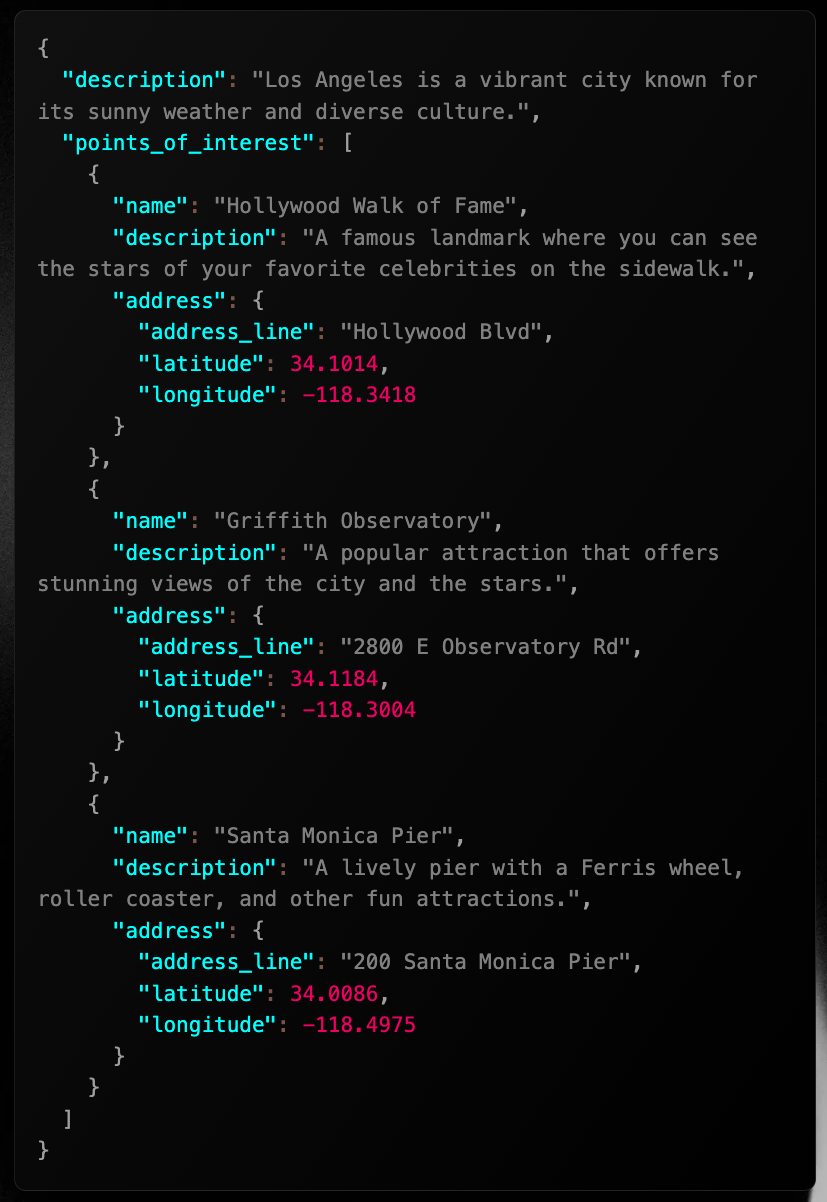 As you can see, we can create complex nested objects with ease.
***
# Conclusion
In this page we learned:
* How one of the building blocks of RΞASON — the `reason()` function — works.
* How to pass an interface to it.
* That it exists the variant `reasonStream()` that is able to stream from the LLM.
Earlier, we briefly mentioned that `reasonStream()` and `reason()` are almost identical, their difference being that `reasonStream()` streams data from the LLM. This makes `reasonStream()` a bit different in its usage — since it is not a normal `async function` that you can `const result = await reasonStream()`.
Since a great LLM app *almost always* needs streaming, being able to use `reasonStream()` is key to building a great LLM app. And that's what we will go over in the next page.
As you can see, we can create complex nested objects with ease.
***
# Conclusion
In this page we learned:
* How one of the building blocks of RΞASON — the `reason()` function — works.
* How to pass an interface to it.
* That it exists the variant `reasonStream()` that is able to stream from the LLM.
Earlier, we briefly mentioned that `reasonStream()` and `reason()` are almost identical, their difference being that `reasonStream()` streams data from the LLM. This makes `reasonStream()` a bit different in its usage — since it is not a normal `async function` that you can `const result = await reasonStream()`.
Since a great LLM app *almost always* needs streaming, being able to use `reasonStream()` is key to building a great LLM app. And that's what we will go over in the next page.