> ## Documentation Index
> Fetch the complete documentation index at: https://docs.tryreason.dev/llms.txt
> Use this file to discover all available pages before exploring further.
# reasonStream()
> Calls a LLM and streams its response
This page builds upon what we discussed in the [previous page about the reason() function](/docs/essentials/reason).
Since `reasonStream()` literally is `reason()` but with a few added bonus, it is necessary to understand `reason()` first.
## Overview
`reasonStream()` is an async function that calls a LLM and streams back to your app its response. Everything you can do with `reason()` you can also do with `reasonStream()`.
```ts src/entrypoints/test.ts theme={null}
import { reasonStream } from "tryreason";
interface City {
description: string;
state: string;
country: string;
population: number;
}
export async function* POST(req: Request) {
const { city } = await req.json()
return reasonStream(`tell me about ${city}`)
}
```
Calling this in the [RΞASON Playground](/docs/quickstart#rksason-playground):
## Using `reasonStream()`
In the previous example, we were just returning `reasonStream()` in our `POST()` function, however `reasonStream()` is an [async generator](https://developer.mozilla.org/en-US/docs/Web/JavaScript/Reference/Global_Objects/AsyncGenerator) — which means there is **much more** we can do with it othen than directly return it.
For instance, let's say we needed to include a picture of the country's flag in the response. How could we do this?
Well, we could ask the LLM for an URL that contains a picture of the country's flag but this is not *ideal* as the URL might be broken, might have expired, etc.
Another way would be to wait for the response from the LLM (that contains the `country` property) and then search the web for a picture of the country. This seems like a good approach.
To do this, we need to introduce a few concepts first.
The next section will be about JavaScript generators, if you are familiar with them, feel free to [skip it](#for-await-reasonstream).
## JavaScript generators
Since `reasonStream()` is a `generator`, we need to fully understand what they are and how they work.
Although this is **not** a feature from RΞASON itself but a native JavaScript feature, it is not widely used so most people are not familiar with them.
### What is a generator?
A generator is just a function that can return **multiple values** rather than just one.
For instance:
```ts A generator example theme={null}
function* generator() {
yield 1
yield 2
yield 3
}
for (const output of generator()) {
console.log(output)
}
```
Will log the following:
```bash theme={null}
1
2
3
```
A generator can also be `async`:
```ts An async generator example theme={null}
async function sleep(ms: number) {
return new Promise(resolve => setTimeout(resolve, ms))
}
async function* generator() {
await sleep(1000)
yield 1
await sleep(1000)
yield 2
await sleep(1000)
yield 3
}
async function main() {
for await (const output of generator()) {
console.log(output)
}
}
main()
```
Will log the following:
```bash theme={null}
(after one second) 1
(after another second) 2
(after another second) 3
```
Important to note three syntax details:
1. To declare a function as a generator you need to add a `*` after the `function` keyword;
2. Generators are just JS [iterators](https://www.perplexity.ai/search/eli5-me-about-QTHl5u.bR8uzHx6FlqU0bA?s=c), therefore you can `for (const yieldedValue of generator()) { }`;
3. To use an `async generator` you need to add an `await` in `for await (const yieldedValue of generator()) { }`.
### Why are they useful?
Because they allows a function to return values as soon as they are available rather than waiting for the whole function to finish and then returning.
Suppose the following:
```ts An async generator example theme={null}
// imagine this does something that takes a couple of seconds
// maybe a HTTP call, maybe some heavy GPU operation, etc
async function doWork() {
// ...
// in the end it returns the output and if it has fully finished
return { output, isDone }
}
async function* generator() {
while (true) {
const { output, isDone } = await doWork()
yield output
if (isDone) break
}
}
async function main() {
for await (const output of generator()) {
console.log(output)
}
}
main()
```
In the example above, you can see why generators can be useful: they allow a function to return values eagerly instead waiting for the function to finish processing and returning the complete result.
Generators shine when there is some processing that:
* Takes some *meaningful* time: if some processing takes nanoseconds, there is *probably* no reason to use generators;
* Has *meaningful* intermediate values: the processing produces values before ending that are **useful** to whomever is calling the generator.
### Generators and LLMs
Turns out LLMs fits this abstraction perfectly!
1. A LLM takes meaningful time — up to 30 seconds — to return the full completion of a given prompt;
2. A LLM has meaningful intermediate values: since LLMs process the prompt + completion from left to right, they can just output the characters as they are generated — which is extremely useful.
Take the hypothetical code that interfaces directly with a LLM:
```ts LLM generator example theme={null}
async function* getCompletion(prompt: string) {
await setupLLM(prompt)
while (true) {
const { characters, isDone } = await llmGetNextCharacters() // takes a second
yield characters // we return the token to whoever called this function
if (isDone) {
break // the LLM has finished the processing
}
}
}
async function main() {
for await (const characters of getCompletion('tell me a joke')) {
console.log(characters)
}
}
main()
```
You can see how LLM inference fits perfectly with generators.
With this new knowledge about generators, we can now go back to `reasonStream()`.
## Iterating through `reasonStream()`
Since `reasonStream()` is an `async generator`, you can use all JS generators features. Such as:
```ts theme={null}
interface City {
description: string;
}
async function* POST() {
for await (const city of reasonStream('Tell me about New York')) {
console.log(city)
}
}
```
Will log the following:
```json theme={null}
{ description: StreamableObject { value: null, done: false } }
{ description: StreamableObject { value: 'New', done: false } }
{ description: StreamableObject { value: 'New York', done: false } }
{ description: StreamableObject { value: 'New York is a state', done: false } }
{
description: StreamableObject {
value: 'New York is a state in the northeastern',
done: false
}
}
{
description: StreamableObject {
value: 'New York is a state in the northeastern United States.',
done: true
}
}
```
As you can see, the `description` property was filled overtime.
Import to note that while we specified in our `City` interface a single `description` property that is a string, `reasonStream` returned a object that has `done` & `value`. Why?
### `StreamableObjects`
All intermediate values that `reasonStream()` yields are `StreamableObjects`.
A `StreamableObject` is just a wrapper for your value that has a `done: boolean` property to indicate whether the LLM has fully finished processing that particular property. This is to help developers know what state a certain property is while being streamed.
A `StreamableObject` has three different *states*:
The `StreamableObject` will be:
```json theme={null}
{ done: false, value: null }
```
The `StreamableObject` will be:
```json theme={null}
{ done: false, value: returnedValueFromLLM }
```
The `StreamableObject` will be:
```json theme={null}
{ done: true, value: completedValue }
```
A *"incomplete value"* is a value that the LLM has started returning but has not finished yet.
It is important to note that LLMs returns characters from left to right, so incomplete values are filled from left to right as if they were strings.
For instance:
```ts theme={null}
interface Joke {
joke: string;
/** The age rating of the joke */
rating: number;
}
export async function* POST() {
for await (const joke of reasonStream('Tell me a spicy joke')) {
console.log(joke)
}
}
```
The `rating` property will be filled like this:
```json theme={null}
{ rating: { done: false, value: null } }
{ rating: { done: false, value: 1 } }
{ rating: { done: true, value: 18 } }
```
`reasonStream()` yields like this is because in *almost all* scenarios that you need to access intermediate values, you also need to know when a certain value has been fully returned from the LLM or not.
### `StreamableObject` in nested properties
**All** values (and sub-values) are wrapped in `StreamableObjects`. Even nested properties, such as array elements & object properties.
For instance, given the following interface:
```ts theme={null}
interface City {
points_of_interest: {
name: string
address: {
latitude: number;
longitude: number;
}
}[]
}
```
The corresponding `StreamableObject` will be:
```json theme={null}
{
"points_of_interest": {
"value": [
{
"done": true,
"value": {
"name": {
"value": "Central Park",
"done": true
},
"address": {
"value": {
"latitude": {
"value": 40.7829,
"done": true
},
"longitude": {
"value": -73.9654,
"done": true
}
},
"done": true
}
}
},
// ...
}
```
### What this all means?
The reason we introduced `StreamableObjects` is because to iterate through `reasonStream()` you'll to handle them.
In the example we lay out previously, we had this code:
```ts src/entrypoints/test.ts theme={null}
import { reasonStream } from "tryreason";
interface City {
description: string;
state: string;
country: string;
population: number;
}
export async function* POST(req: Request) {
const { city } = await req.json()
return reasonStream(`tell me about ${city}`)
}
```
And we wanted to include a picture of the country's flag in the response by waiting for the response from the LLM (that contains the `country` property) and then searching the web for a picture of the country.
Let's do it:
```ts src/entrypoints/test.ts theme={null}
import { reasonStream } from "tryreason";
interface City {
description: string;
state: string;
country: string;
// 👇 new property. returns 'US' for United States, 'AU' for Australia, etc.
country_code: string;
population: number;
}
// 👇 new function to get the picture of the country's flag
function getFlag(countryCode: string): string {
return `https://flagsapi.com/${countryCode}/flat/64.png`
}
export async function* POST(req: Request) {
const { city } = await req.json()
// iterating through `reasonStream()`
for await(const cityInformation of reasonStream(`tell me about ${city}`)) {
/* we check if the LLM has finished outputting the country code
before getting the flag's picture.
we do this because it makes no sense to try to get the flag
if the LLM has not returned a country code or is in the
middle of returning it. */
if (cityInformation.country_code.done) {
/* 👇 we then add a new property to `cityInformation` that
will be streamed back to the client */
cityInformation.county_picture = getFlag(cityInformation.country_code.value)
}
/* 👇 this line is responsible for streaming to the
client the cityInformation object. */
yield cityInformation
}
}
```
Here's the output we get from calling the `test` entrypoint in the [RΞASON Playground](/docs/quickstart#rksason-playground):
### Returning `StreamableObjects` to the client
You may have noticed above that while `reasonStream()` yields `StreamableObjects`, the response that was streamed from RΞASON to the client (the Playground in this case) is a regular object and not a `StreamableObject`.
Why?
Because all `StreamableObjects` yielded from your entrypoints are unwrapped to their original form. This is done because almost never you actually want to return `StreamableObjects` to your client.
## Modifying `StreamableObject`
You might have noticed that in the previous example, we added a new property called `country_picture`:
```ts src/entrypoints/test.ts theme={null}
import { reasonStream } from "tryreason";
interface City {
// ...
}
function getFlag(countryCode: string): string {
// ...
}
export async function* POST(req: Request) {
// ...
for await(const cityInformation of reasonStream(`tell me about ${city}`)) {
if (cityInformation.country_code.done) {
// 👇 here
cityInformation.county_picture = getFlag(cityInformation.country_code.value)
}
// ...
}
}
```
This is relevant because it shows that you can modify the `StreamableObject` that `reasonStream()` yields to your needs. This can be useful when you want to add some extra information to the object that is not returned from the LLM: add a new property, modify an existing one, etc.
## Iterating through nested objects
This will be an advanced example in order to solidify the knowledge of how you can iterate through `StreamableObjects` even with complex interfaces — such as nested objects inside of arrays.
If you don't feel like going through that now, feel free to [skip it](#conclusion).
Going back to our [Quickstart example](/docs/quickstart#calling-getdistance) where we had the following code:
```ts theme={null}
import { reasonStream } from 'tryreason'
import getDistance from '../actions/getDistance'
interface City {
/** A two sentence description of the city */
description: string;
points_of_interest: {
name: string;
description: string;
address: {
address_line: string;
latitude: number;
longitude: number;
};
}[];
}
export async function* POST() {
const res = await fetch(`http://ip-api.com/json/`)
if (res.status !== 200) {
return new Response('Error', { status: 500 })
}
const { city, lat, lon } = await res.json()
return reasonStream(`Tell me about ${city}`)
}
```
The `City` interface consists of a complex object that has the `points_of_interest` property being an array of objects. Here's what this [entrypoint](/docs/essentials/entrypoints) outputs:
```json theme={null}
{
"description": "San Francisco is a vibrant city located in California. It is known for its iconic landmarks such as the Golden Gate Bridge and Alcatraz Island.",
"points_of_interest": [
{
"name": "Golden Gate Bridge",
"description": "The Golden Gate Bridge is a famous suspension bridge that spans the Golden Gate Strait. It is an iconic symbol of San Francisco.",
"address": {
"address_line": "Golden Gate Bridge, San Francisco, CA",
"latitude": 37.8199,
"longitude": -122.4783
}
},
{
"name": "Alcatraz Island",
"description": "Alcatraz Island is a former federal prison located on an island in the San Francisco Bay. It is now a popular tourist attraction.",
"address": {
"address_line": "Alcatraz Island, San Francisco, CA",
"latitude": 37.8267,
"longitude": -122.4233
}
}
]
}
```
We want to calculate the distance between the user & the points of interest, to do that we have:
* the latitude & longitude of the user and points of interest;
* a function that calculates the distance between two pairs of latitude/longitude (in meters) (`getDistance()`).
What we need to do now:
* call the getDistance() function for each point of interest to get the distance of the user from that location;
* return the distance in the streaming response.
Let's do it:
```ts theme={null}
import { reasonStream } from 'tryreason'
import getDistance from '../actions/getDistance'
interface City {
/** A two sentence description of the city */
description: string;
points_of_interest: {
name: string;
description: string;
address: {
address_line: string;
latitude: number;
longitude: number;
};
}[];
}
export async function* POST() {
const res = await fetch(`http://ip-api.com/json/`)
if (res.status !== 200) {
return new Response('Error', { status: 500 })
}
const { city, lat, lon } = await res.json()
// 👇 New code is all here
for await (const cityInformation of reasonStream(`Tell me about ${city}`)) {
if (cityInformation.points_of_interest.value) {
/* 👆 We need to first check if the LLM has started returning
the points_of_interest (by checking if its not null) */
for (let point_of_interest of cityInformation.points_of_interest.value) {
// 👆 Loop through each point of interest
if (point_of_interest?.value?.address?.done) {
/* 👆 Check if the LLM has fully finished returning
the address property.
We do this because we only want to calculate the distance
when the address has been fully returned from the LLM. */
const poiLatitude = point_of_interest.value.address.value.latitude.value
const poiLongitude = point_of_interest.value.address.value.longitude.value
point_of_interest.value.distance = getDistance(lat, lon, poiLatitude, poiLongitude)
/* 👆 We add a new property to the point_of_interest called `distance`
that represents the distance from the user in meters */
}
}
}
yield cityInformation
/* 👆 Whenever we yield a value in an entrypoint
that value is immediatly streamed back to the client.
So here we're just streaming cityInformation. */
}
}
```
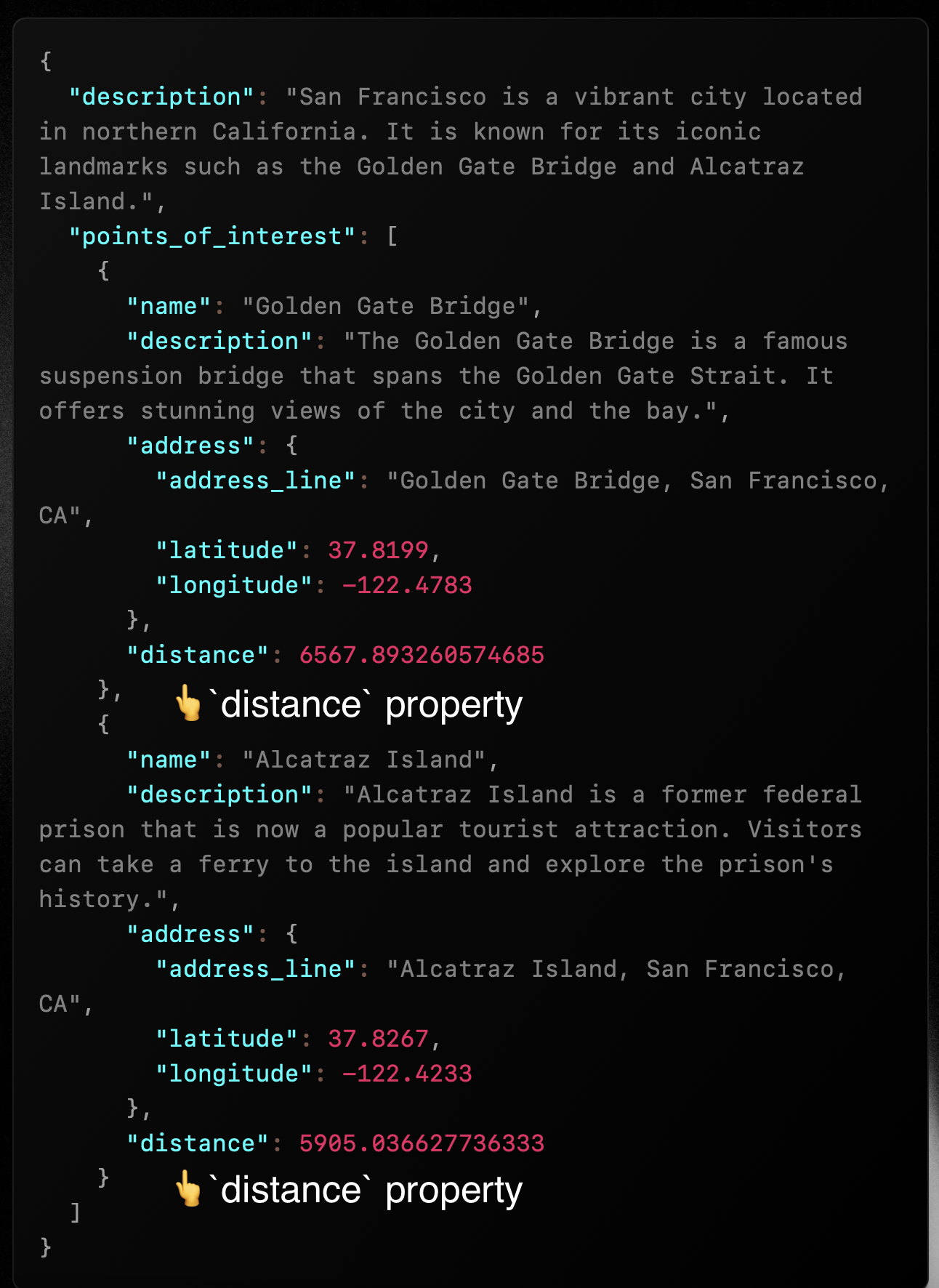
And here's the output:
### A note on modifying nested `StreamableObjects`
You can only modify the `value` property of the `StreamableObject` — the `done` property is read-only. For instance, in `point_of_interest.value.distance = ...` we are adding a new property to the `value` property of the `point_of_interest` object.
If we did `point_of_interest.distance = ...`, it would not work as we would be trying to modify the `StremableObject` itself and its `value`.
***
## Conclusion
In this page we learned how to work with `reasonStream()` in your code. Although there is more to learn about `reasonStream()`, this page should be enough to get you started.
Next, we'll be going in-depth about the concept of [agents](/docs/essentials/agents) in RΞASON.